

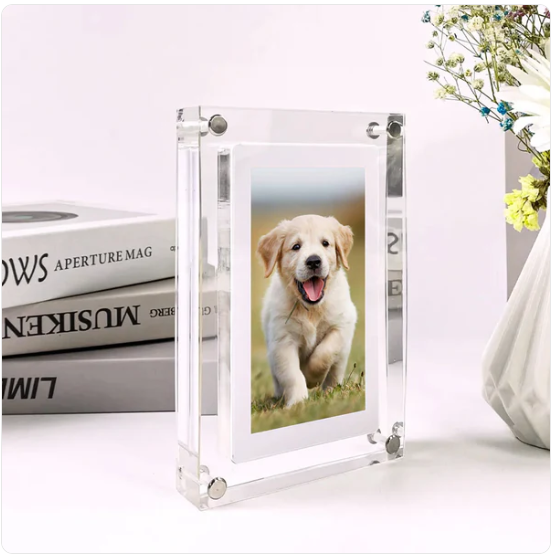
Qafas Diġitali
Qafas Diġitali
 Bejjiegħ Uffiċjali ta’ Pinterest
- Ħlas Garantit Sikur u Protett
- Kunsinna Dinjija Rapida
Ma setax jitla' l-għażla ta' preżenza għall-ġbir
-
Ordnat
- - -
Ordni Lesta
- - -
Ittieħed
★★★★★
"Il-Qafas Diġitali kien rigal għan-nanniet tiegħi, u ma jistgħux jieqfu jfaħħruh. Iħobbu jaraw ritratti ġodda tal-familja, u huwa mod mill-aqwa biex nibqgħu konnessi magħhom."
Joslynne Marie
SETUP FAĊLI

TELLIB
Qabbad ma’ kwalunkwe kompjuter billi tuża l-kejbil ipprovdut, iddreggja, qiegħed—lest! Il-proċess huwa rapidu u intuwittiv, u jagħmilha faċli żżid il-memorji favoriti tiegħek.
IBDEL
Ibdel jew aġġorna l-vidjows faċilment billi tħassar il-fajls qodma u żżid oħrajn ġodda. B’hekk tista’ żżomm kont ta’ kull mument speċjali bi ftit sforz.
IL-QAFAS DIĠITALI FL-UŻU


KIF TUŻAH
1. Qabbad il-Qafas Diġitali mal-PC tiegħek billi tuża l-kejbil USB-C ipprovdut.
2. Iddreggja u qiegħed ir-ritratti/vidjows tiegħek fil-folder indikat li jidher, u kun żgur li jkunu fil-format korrett.
3. Irranġahom fl-ordni preferuta tiegħek biex toħloq wirja bla xkiel f’ċiklu kontinwu.
4. Skonnettja, ixgħel, u gawdi l-memorji tiegħek f’ċiklu kontinwu!
Parir: Irranġa jew ħassar il-fajls fi kwalunkwe ħin biex taġġorna s-sekwenza tal-preżentazzjoni tal-islajds mingħajr sforz.
Kunsinna u Ritornijiet
Kunsinna u Ritornijiet
Nagħmlu xogħol ma’ sħab tat-trasport affidabbli bħal USPS, DHL, UPS, Canada Post, Royal Mail, Australia Post, u vetturi oħra affidabbli biex niżguraw tbaħħir sigur u affidabbli madwar id-dinja. Kull ordni tinkludi informazzjoni dwar it-trakkjar, li tippermettilek issegwi t-tbaħħir tiegħek faċilment mill-ħruġ sal-wasla.
Ir-ritorni jiġu aċċettati fi żmien 14-il jum mid-delivera. Jekk għandek xi mistoqsijiet jew għandek bżonn għajnuna, it-tim tas-servizz tal-konsumatur tagħna huwa disponibbli biex jgħinek matul il-ħinijiet tan-negozju.

50,000+ KLIJENTI SODISFATTI


X'Qegħdin Jgħidu l-Klijenti Tagħna
Feedback reali minn xerrejja reali
MISTOQSĦI FREKWENTI
Tibgħat madwar id-dinja kollha?
Tibgħat madwar id-dinja kollha?
Iva, noffru tbaħħir madwar id-dinja. Il-miżati tat-tbaħħir huma murija b’mod ċar fil-ħin tal-ħlas. Jekk il-pajjiż tiegħek mhuwiex disponibbli, tħossok liberu li tikkuntattjana qabel tagħmel ordni. Skontijiet u promozzjonijiet speċjali huma disponibbli matul is-sena kollha—ibqa’ attent għal offerti esklussivi.
Nista' nsegwi l-kunsinna tal-ordni tiegħi?
Nista' nsegwi l-kunsinna tal-ordni tiegħi?
Assolutament. Ladarba l-ordni tiegħek tkun ġiet mibgħuta, tirċievi numru ta’ traċċar bl-email. Tista’ ssegwi l-kunsinna tiegħek permezz tal-paġna Track Your Order tagħna, is-sit tal-kurrier, jew l-app Shop. Jekk jogħġbok agħti ftit ħin biex l-aġġornamenti tat-traċċar jidhru.
Kif nista' nirritorna jew nibdel oġġett?
Kif nista' nirritorna jew nibdel oġġett?
Aċċettaw ritornijiet fi żmien 14-il jum mill-kunsinna għal oġġetti eliġibbli li mhumiex użati u jinsabu fil-kundizzjoni oriġinali. Biex tibda ritorn, jekk jogħġbok ikkuntattja lit-tim ta’ appoġġ tagħna għall-approvazzjoni qabel tibgħat xi ħaġa lura. Ma hemmx skambji disponibbli f’dan il-ħin.